How I'd Set Up a Development and Release Lifecycle
Table of Contents
- Intro
- Development Lifecycle
- Release Lifecycle
- The Processes When AI Writes the Code
- Improving the Process When Something Goes Wrong
- Conclusion
- FAQ
Intro
Keep the local development flow simple, let devs point their dependency endpoints at the dev cluster instead of running the whole platform on a laptop, and publish every image to an immutable registry with a matching git tag.
When working as SRE or DevOps engineer, I’m often asked to review and help improving processes around development and release lifecycles. Although this topic varies quite a lot from company to company (and depends on the company use-case and type of products the company needs to build), there are some standard practices that should be common across all scenarios.
I’m deliberately not prescribing a specific stack for this process because I want to focus only on discussing the high level idea. It can be implemented regardless of the stack.
Development Lifecycle
For the sake of this post, I’ll consider development lifecycle to be everything that goes from the initial stage of changing a line of code (to implement a new feature/fix a bug/enhance a functionality/etc) to the final stage of pushing the docker image to the registry.
According to my recent professional experiences, this topic has two big sub-topics: local development flow and publishing the code as a docker image into the registry.
Local Development Flow
When devs need a dependency service, let them point their local service at the dev cluster instead of running the whole platform on their laptop.
This is usually the topic that leads to the most passionate discussions and in which teams have multiple opinions. And it’s also a tricky one because we, SRE engineers, are asked to intervene and help improve the situation but the people that actually use the flow are the developers. Because of this, it’s extremely important we talk to the devs and understand what the pain points are and how can we better help them.
The simpler we keep this local development flow, the easier it will be for everyone in a long term perspective. It will also make it much easier to scale the process. By “scale the process” I mean quickly onboard new developers and allow them to easily add features into the codebase.
And how should we keep it simple? By keeping everything modular and easy to test. For example, if I’m doing a change in a BFF (Backend-For-Frontend) service, I should be able to identify what inputs the service will be receiving and, based on those inputs, what are the expected outputs.
If I know this, then when I’m changing the BFF service I can easily adapt the test suite to include the new inputs and assert that the outputs match. Then, when I’m done with changing the code, I can just run the test suite against this service (that I might or might not be running locally on my machine) and be confident that my changes work as expected.
However, sometimes we actually need to connect our local instance of the service into other services to test that the integration works as expected. The obvious approach is to start the other services locally too and test everything locally. However, this has some issues that we shouldn’t ignore:
- as the platform grows, running dependency services locally will require more and more compute resources. It will eventually be a problem and slow down the development process;
- as more features are introduced to the dependency services, we need to keep updating them to the latest version in our local machine. It will also be a problem as the platform scales.
So, how can we solve it? Let the devs point the dependency service endpoint at the dev environment, so the local service they are developing sends its requests to the services running in the dev cluster. But this also comes at a cost:
- devs need to have direct access to the dev environment;
- if the local tests the devs are doing actually changes state (like inserting something into a database, for example), then the tests will affect everyone else.
In my opinion this is okay, especially the second point: it will force teams to be in direct communication with each other and also to improve the testing suite to avoid affecting each others work. Mock tests sit between unit tests and integration tests: they verify how our service talks to a dependency without a live one on the other side. Pointing at the dev cluster is the integration test itself, so the more we cover with mocks, the less often we need to run tests that change state in the dev environment.
In short, this is how I see the local development flow:
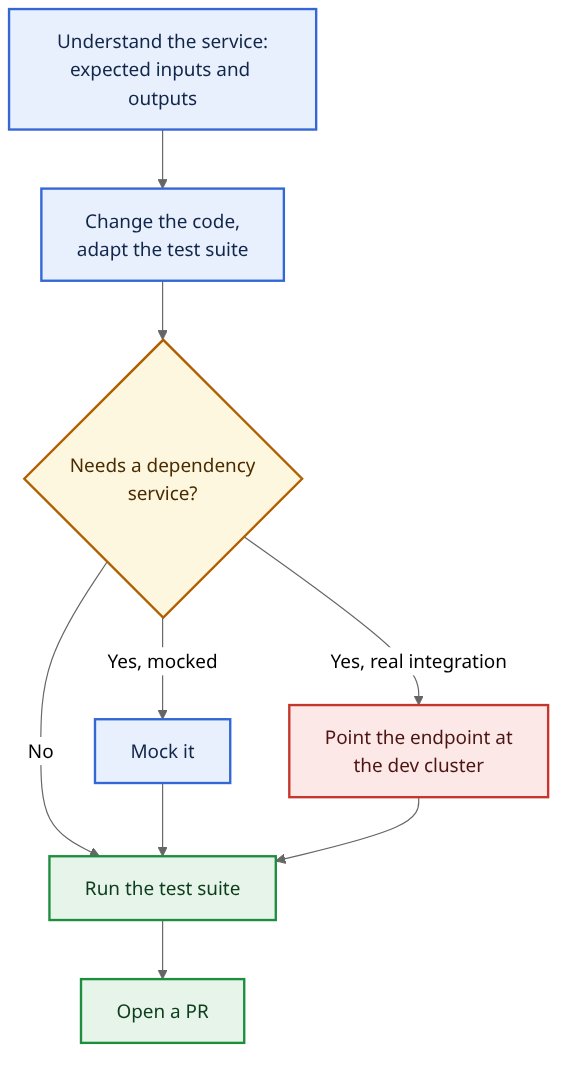
Image Publishing
Once the devs are happy with the code changes, they need to actually package them and publish them to whichever registry they use.
Unlike the local development flow, this is usually a much less controversial topic: the flow is more or less the same everywhere, with some adjustments to fit the company needs.
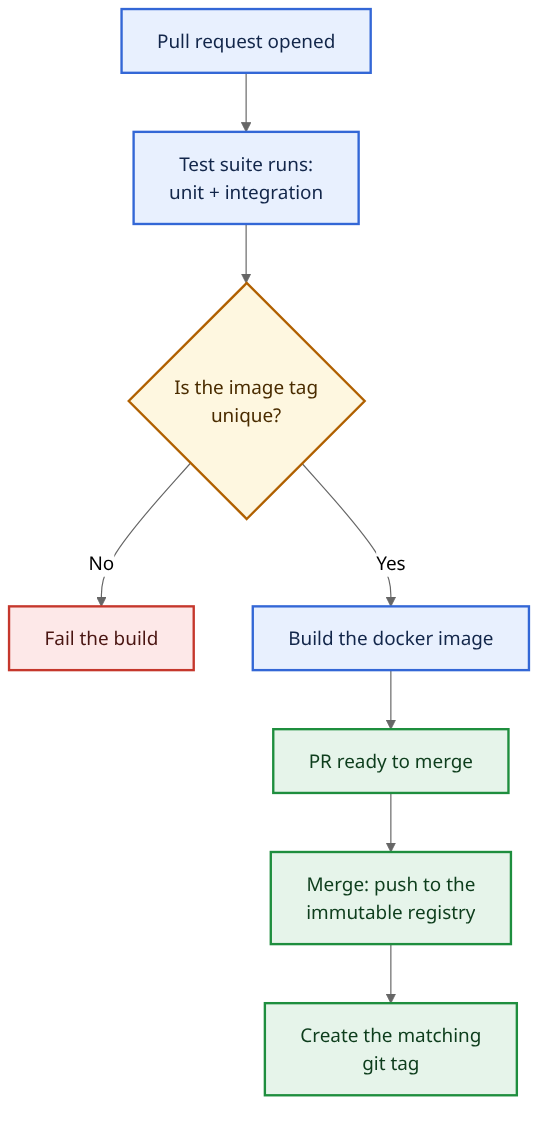
The registry immutability part is quite important. It’s a setting on the registry itself: once myservice:1.2.3 is
pushed, the registry rejects any attempt to push that same tag again. That means we need to tag the images with proper
tags and can NOT use latest, dev or any other common tag.
The unique tag check in the CI pipeline does not enforce immutability: the registry does. It fails the pipeline early, before we spend time on a build that the registry would reject at push time anyway.
This makes it much easier to debug certain bugs: if I know the bug is happening in image myservice:1.2.3, I can pull
that image and see what code is running there.
It also helps a lot in case the company is pursuing ISO certifications or other type of Compliance certifications: usually auditors are really happy to see that the images are immutable and that there’s a well-defined process we need to follow in case we need to change them.
In regards to the tag, my only hard requirement is that the tags have an obvious chronological order: looking at images
myservice:xxyyzz and myservice:nnkkoo tells me nothing about which one is newer, so bare commit SHAs are out. Semver
gives that order, date-based tags do too; for this post I’ll go with semver. After the docker image is published as
myservice:1.2.3, create a matching git tag 1.2.3. The tag has to be created by the CI pipeline, from the exact
commit it built the image from, and never by a human afterwards. Get that right and git fetch --tags && git checkout
TAG gives us the exact code that is running in the docker image tagged TAG.
Release Lifecycle
The release lifecycle is everything that happens after the image exists: getting that exact image running in each environment, and getting it back out again when it breaks.
Once the image has been published to the registry, we need to deploy it in the correct environments. Some people like to have one branch per environment, but I personally dislike that option: the more branches we have, the more merge conflicts we’ll have to deal with and the benefit is quite low.
The simplest approach is to have one configuration file per environment and define in that configuration file which image versions are deployed per env.
# environments/dev.yaml
myservice: 1.2.3
For example, once image 1.2.3 has been published to the registry, we edit the configuration file of an environment to
use that 1.2.3 version and deploy it there. For dev we don’t even do that by hand: a CI job commits directly to the
config repo. When a new image is published, it edits the dev config file and pushes the commit. No PR, no human in the
loop for dev.
That gives us the following flow:
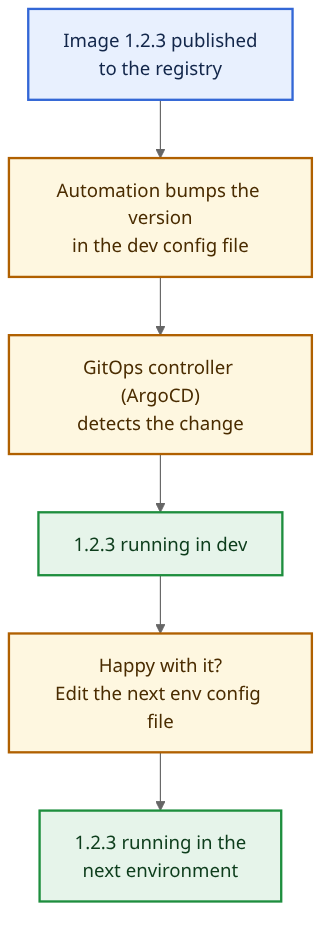
Well, but what happens if that image has a bug and we need to rollback? In that case, all we need to do is to edit the configuration file and revert to the previous version. ArgoCD (assuming we are using Argo) will notice the changes and deploy the respective version. The automation only bumps the config file when a new image is published, so it will not overwrite the revert.
If we follow this approach, we’ll have only 1 branch (which makes our processes easier) and we’ll have code as source of truth, so it’s really easy to control what runs where.
The Processes When AI Writes the Code
I wrote about my own Claude Code workflow a while back. Given that nowadays AI is writing most of the code (and it won’t be writing less of it in the future), how do the processes described above get affected?
They are even more necessary in a world of AI: the faster we write the code, the faster we need to test it and release it (otherwise if the feedback cycle is too slow we’ll create big bottlenecks and make it more difficult to add more features to the codebase).
We should rely more and more on automated testing and deterministic guardrails:
- if we have strong unit/mock tests, the AI can easily test if its changes break anything or work as intended;
- if we have strong guardrails on CI level, we can prevent bad code from being merged because the CI pipeline will flag it.
Of course this is not as easy as we might think: the more tests and guardrails we have, the longer the CI pipeline will take. Also, adding unit tests is not something we should blindly delegate to the AI: we can have a lot of unit tests that are kind of useless, so they are just burning time. One rule that filters most of the useless ones: unit tests should assert on behaviour, not on implementation details.
Improving the Process When Something Goes Wrong
It’s crucial that we accept that mistakes will happen and bugs will be introduced to the dev environment (thus making it more unstable) when we’re running a process like the one described in this post. However, that should be seen as an opportunity to improve the testing suite and make them stronger for next time!
So, when we deploy unintended bugs, we should go back to the process and check what failed: why didn’t unit tests catch the bug? Or mock tests? Or integration tests? And if all of them pass, why didn’t other deterministic guardrails catch it? If we identify what failed and fix it, then we have a stronger test suite and/or stronger guardrails that will prevent a similar situation to happen again in the future.
After some time, we’ll gain enough confidence in the processes to be able to quickly add features to the codebase and reliably deploy them to all the necessary environments.
Conclusion
The more effort we put in keeping the process simple, the bigger the reward. The process described here is simple enough that it can scale while allowing developers to have fast feedback cycles and fast rollbacks when there are bugs.
Also, there are quite a few topics around this theme that are not mentioned in this post (gradual rollouts of new versions, what to do in case we need to provide different versions of our product to different customers, feature flags, etc), but that will be for another time :)
If you read this and want to share your opinion with me, reach out on Twitter/X or send me an email at contact.blog@acascais.com.
FAQ
How can I test my changes when I change the codebase?
The goal is to have a strong test suite so that we can test our changes to the codebase in a quick and deterministic way. This also allows us to only have to run our service and no other dependencies. This will take a bit to setup at the beginning, but it will soon payoff.
How can I ensure that the dev environment is usable?
Well, if we can’t reliably depend on our test suite to ensure no bugs are deployed to dev, then we also can’t trust them to prevent bugs from getting to prod environment. With a strong test suite, bugs will be caught before getting to dev, so that environment will be ready to be used (probably unstable due to all the constant deployments, but usable).
What if I need to patch an image with a hot fix?
A hot fix is a red flag (it means a bug was not caught by any test, guardrail nor in any of previous environments), so
it is expected to have to do them quite rarely.
Ideally, we can revert our service to previous version to give us time to fix whatever needs to be fixed, but if
that’s not the case and we really need to add a hot fix, we can branch off git tag 1.2.3, apply the
hot fix, and let the same pipeline build and publish 1.2.3-hotfix1 with its matching git tag. The registry is
immutable, so we can’t re-push 1.2.3, and that’s the point: the broken image stays around for us to compare against.