Adding a Daily Log to My Claude Code Knowledge System
Table of Contents
Intro
In my previous post I talked about how I configured Claude Code to take notes and build a knowledge base. The system works well: task notes capture what matters, knowledge base entries grow organically, and Obsidian ties it all together.
But I had two problems. First, the notes system is designed for durable knowledge: things that persist across sessions and projects. It doesn’t capture the day-to-day stuff well: what happened in this session, what decisions were made, what’s left pending. That context disappears between conversations.
Second, notes keep growing. At some point they need to be trimmed or archived, and when that happens some useful context gets lost. Maybe it wasn’t important enough to keep in notes, but 3 weeks later you’re looking at a git commit and thinking “why did we do it this way?”.
The daily log fixes both problems. It captures session-level context without bloating the notes, and it gives you a timeline you can go back to: check the date on a commit, go read that day’s log, get the full picture.
The Two-Tier Model
Before diving into the implementation, let me explain the mental model.
I now have two layers of notes:
- Daily log: ephemeral, session-level. Think of it like a standup update: “here’s what I did, here’s what’s pending, here’s what I learned”. One file per day, per project.
- Notes: durable, curated. Think of it like documentation: lessons learned, architecture decisions, patterns. The stuff from my previous post.
Not everything deserves to be in notes. Most session context is throwaway — “ran migrations, fixed a typo in the config, deployed to staging”. That’s useful tomorrow morning, not next month.
But sometimes, in the middle of a session, you stumble onto something worth preserving: a non-obvious gotcha, a pattern that worked well, a decision that future-you will want to remember. Those items should graduate from daily log to notes.
Both are written by Claude, but at different levels of detail and with different lifespans. Daily logs are quick session summaries I don’t review. Notes are more thorough and I review them before they’re saved. When something in the daily log is worth keeping long-term, it can be promoted to notes: either manually or through the hook I’ll describe later.
The Daily Log Skill
What It Does
The /daily-log skill appends a mid-level session summary to a per-project daily log file. The file structure looks like this:
tasks_notes/
├── scully-facts/
│   ├── notes.md
│   └── daily_log/
│       ├── 2026-02-25.md
│       ├── 2026-02-26.md
│       └── 2026-02-28.md
├── my-other-project/
│   ├── notes.md
│   └── daily_log/
│       └── ...
You can either pass the project name as an argument (/daily-log scully-facts) or let Claude infer it from the conversation context. If it’s ambiguous, it asks.
Each entry is timestamped, so multiple sessions in the same day get appended to the same file:
## 10:30

- Implemented retry logic for Perplexity API timeouts
- Decision: chose exponential backoff over fixed intervals because request patterns are bursty
- **→ notes.md**: Perplexity SDK has a 25s hard timeout that isn't documented — need to set client timeout lower
- Left pending: error UI for rate limit responses

## 15:45

- Finished rate limit error handling
- Deployed to staging, tested with concurrent users
The Right Level of Detail
Getting the right level of detail was important. I explicitly configured the skill with examples of what’s too much and what’s too little.
Too detailed (avoid):
- Every file touched or command run;
- Line-by-line change descriptions;
- Full error messages or stack traces.
Too vague (avoid):
- “Worked on the project”;
- “Fixed some bugs”;
- “Made progress on feature X”.
Just right:
- Key actions and outcomes;
- Decisions and the reasoning behind them;
- Problems and how they were resolved;
- What’s left pending.
It’s what you’d want to read tomorrow morning to remember what happened. No more, no less.
Flagging Items for Promotion
This is where the daily log connects to the notes system. When Claude writes a daily log entry and encounters something with lasting value — a lesson learned, a gotcha, a pattern worth remembering — it flags it with a specific marker:
- **→ notes.md**: Perplexity SDK has a 25s hard timeout that isn't documented
The format is strict on purpose: **→ notes.md**: (bold, arrow, colon). It’s designed to be grep-able, because that’s exactly what happens next.
Not everything gets flagged. Most daily log entries are session-specific and don’t need to go anywhere. The flag is only for things with lasting value.
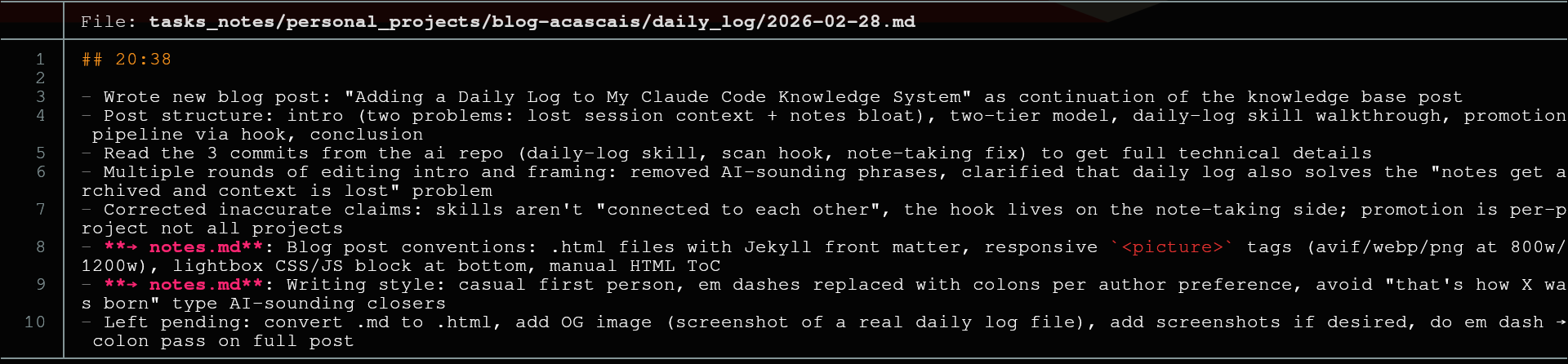
Here’s what a real daily log entry looks like:
The Promotion Pipeline
The daily-log skill doesn’t know anything about note-taking. But the note-taking skill knows about daily logs: when you invoke /note-taking, a hook scans for flagged items and feeds them as context. So the promotion is triggered from the note-taking side.
The Hook
Claude Code has a feature called hooks: shell commands that execute in response to events. One of those events is UserPromptSubmit, which fires when you send a message to Claude.
I added a UserPromptSubmit hook to the note-taking skill. When you invoke /note-taking, a shell script (scan-daily-logs.sh) runs before the skill processes your message. The script:
- Scans all project
daily_log/directories for files with**→ notes.md**:markers; - Skips files already marked as processed (
<!-- notes-processed: -->); - Always includes today’s file (even if processed: you might have added new entries);
- Outputs the scan results as context into the note-taking skill, which then only promotes items for the current project.
How It Works
The flow looks like this:
- You work on something, end the session, run
/daily-log; - Claude writes the daily log, flags 2 items (for example) with
**→ notes.md**:; - Later (maybe next day, maybe next week), you run
/note-taking; - The hook fires, scans daily logs, finds 2 unflagged items;
- Note-taking sees the scan results and includes those items in its proposal;
- You review and approve (like any other note-taking update);
- After promotion, markers flip from
**→ notes.md**:to**✓ promoted**:and the file gets a processed timestamp.
The important thing: you don’t have to tell /note-taking to check the daily logs. You don’t have to remember which items were flagged or in which files. The hook does all of that. You just run /note-taking as you normally would and the flagged items show up in the proposal.
The contract between the two skills is the marker format. It’s a simple grep pattern, nothing fancy. But that simplicity is what makes it reliable: no database, no state file, just text patterns in markdown files.
Conclusion
My note-taking system now has a clear lifecycle: session → daily log → notes → knowledge base. Each tier has a different purpose and shelf-life.
The daily log fills a gap I’d been feeling for a while. It’s low-friction (just /daily-log at the end of a session), it gives me a “what happened yesterday” reference, and it feeds the notes system. Combined with the rest of my Claude Code workflow, it means I rarely lose context between sessions anymore.
If you want to set up something similar, the configs are in the same claude-code-knowledge repo from the previous post.
If you have any questions or feedback, reach out via email (see below) or via Twitter/X.